 SnapFood
Macro tracking has a reputation problem: it sounds like a part-time job with a spreadsheet. It used to be. But the actual idea is simple, and with photo logging the bookkeeping is nearly free — so let's separate the idea from the admin.
What macros actually do
- Protein (4 kcal/g) builds and protects muscle, and it's the most filling macro per calorie — the main lever for body composition and hunger control.
- Carbohydrates (4 kcal/g) are your primary fuel, especially for training and thinking. Fiber — tracked separately in SnapFood — is the part of carbs your gut thanks you for.
- Fat (9 kcal/g) supports hormones and lets you absorb certain vitamins. Densest macro, easiest to overshoot invisibly (oils, dressings).
Setting beginner targets (without a coach)
- Calories first. Your budget comes from your goal — see how many calories should you eat a day.
- Protein second. Common evidence-based range if you train: ~1.6–2.2 g per kg of body weight per day (the RDA baseline for sedentary adults is far lower, 0.8 g/kg — most people tracking macros do better nearer the training range). 70 kg person training regularly → ~115–150 g/day.
- Fat in range. Roughly 20–35% of calories. On 2,000 kcal that's ~45–78 g.
- Carbs fill the rest. Whatever calories remain after protein and fat — no moral judgment attached.
SnapFood does this arithmetic for you in onboarding: body, activity, goal in — daily calorie and macro targets out.
The part that makes people quit (and the fix)
Knowing your targets is five minutes of math. Hitting them used to mean weighing chicken and searching "rice, cooked, 1 cup" forever. That's the part photo logging deletes: snap the plate, and SnapFood returns protein, carbs and fat per ingredient — plus fiber, sugar, saturated fat, sodium and micronutrients like iron and vitamin D. Your dashboard shows each macro's progress bar for the day, so "am I short on protein?" is a glance, not an audit.
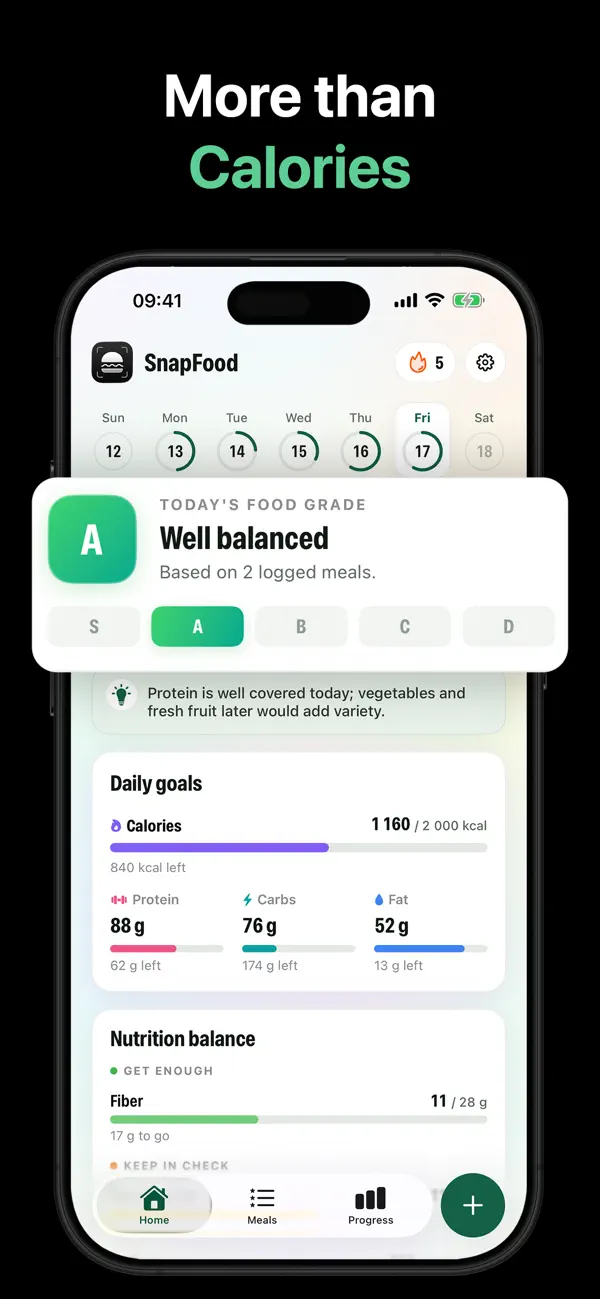
Track macros in SnapFood, step by step
- Set your goal in onboarding. Lose, maintain or gain — your calorie and macro targets are generated from your answers.
- Snap every meal. Each scan splits into protein, carbs and fat automatically. No database search, no portion guessing — see how photo counting works.
- Correct what's hidden. "The dressing was on the side." "Double chicken." One sentence updates the macros and the grade.
- Check the bars mid-afternoon. Short on protein with 600 kcal left? That's a data-driven dinner decision.
- Use the library filters. Your Meals Library tags meals high-protein, high-fiber, low-carb — when you need 40 g of protein for under 500 kcal, the answer is one tap away.
Three beginner mistakes to skip
- Chasing a perfect split daily. Macros are weekly averages wearing a daily costume. Close counts.
- Ignoring fiber. It's technically a carb, practically a superpower. SnapFood tracks it in the "Get enough" panel.
- Treating fat as the enemy. Too little backfires. Keep it in range; spend it on food you enjoy.
Macros from a photo
Protein, carbs, fat and 15+ nutrients per scan — tracked against targets built for you. Free on the App Store and Google Play.
Frequently asked questions
What macro split should a beginner start with?
Do I need macros, or are calories enough?
Can SnapFood really read macros from a photo?
Nutrition values, grades and recommendations in SnapFood are AI-generated estimates and may be inaccurate. This guide is general information, not medical or dietary advice. Protein and macro needs vary by individual — consult a qualified professional for personal guidance.