 SnapFood
Calorie apps are excellent at producing numbers and terrible at producing decisions. Is 640 kcal with 42 g of protein and 24 g of fat… good? For you, today, given what you already ate? A grade answers the question the numbers only gesture at. Here's how to read it.
The scale, grade by grade
- S — exceptional. The plate that does nearly everything right: solid protein, real fiber, restrained added sugar and saturated fat. Grilled salmon with greens territory. Rare by design — if everything is an S, nothing is.
- A — strong fit. Well-balanced with minor trade-offs. Most genuinely good home cooking lands here. "Chicken and avocado provide protein and satisfying fats" — that kind of plate.
- B — decent, with trade-offs. Real nutrition present, but something noticeable to watch: refined carbs doing the heavy lifting, sodium creeping, portion generous.
- C — several watch-outs. The nutrients to limit are starting to outweigh the ones to aim for. Fine as an exception; worth noticing as a pattern.
- D — leans heavily on the limit list. Lots of saturated fat, added sugar or sodium; little protein or fiber to show for it. The double cheeseburger and fries reads D and you both knew it would.
What the AI weighs when it grades
A grade summarizes the whole plate, not a single villain nutrient. The signals SnapFood reads from every scan include:
- The "get enough" side: protein, fiber and the micronutrients a meal contributes.
- The "keep in check" side: added sugar, saturated and trans fat, sodium, cholesterol.
- Balance and density: how the calories are spent — 640 kcal of chicken-avocado bowl and 640 kcal of pastry are different purchases.
- Portion: change the serving size and the grade recalculates — a taste of dessert and the whole dessert are graded as what they are.
Every grade ships with its reason in one line, so you're never left reverse-engineering the verdict. And because grades come from the photo, they work on meals no label-based system can touch — see how that compares in counting calories by taking a picture.
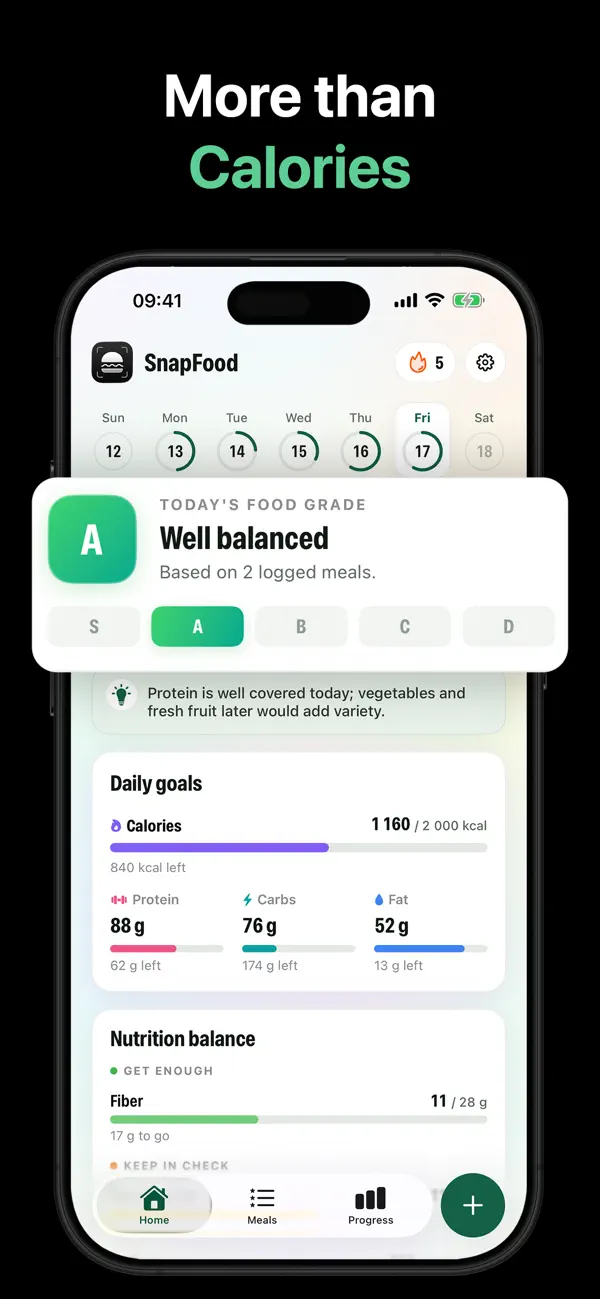
The day grade: your day, at a glance
Individual meals matter less than the day they add up to. SnapFood rolls your logged meals into Today's Food Grade — so a C at lunch followed by a protein-and-vegetables dinner can still read as a well-balanced day. It's the difference between judging a movie by one scene and watching the whole thing.
How to raise your grades without overhauling your life
- Read the one-liner. The reason under the grade names the single biggest lever — usually protein up, or one "keep in check" nutrient down.
- Apply the suggested fix. When it helps, SnapFood offers one realistic change: swap the base, halve the dressing, add a protein. One change, not a lecture.
- Watch the pattern, not the plate. Filter your Meals Library by grade — your S and A meals are a personal menu of proven wins. "Log again" is how a grade becomes a habit.
- Let C's and D's exist. The grade is honest feedback, not a fail state. Streaks reward logging, not perfection — the D you log beats the A you imagine.
Get your first grade tonight
Snap your plate — SnapFood grades it from S to D with the reason why, free on the App Store and Google Play.
Frequently asked questions
Is a D-graded meal a failure?
How is this different from Nutri-Score or barcode scanner ratings?
Can a grade change after the scan?
Nutrition values, grades and recommendations in SnapFood are AI-generated estimates and may be inaccurate. This guide is general information, not medical or dietary advice. Consult a qualified healthcare professional before making health or diet decisions.