 SnapFood
The food scale is where most tracking careers go to die. It works — until you eat at a friend's place, order in, cook a stew, or simply get tired of weighing rice like a chemist at 8 pm. If the method only works in a lab-grade kitchen, it's not a method; it's a phase. Here's how to keep the numbers without the hardware.
Method 1: let the photo do the portioning
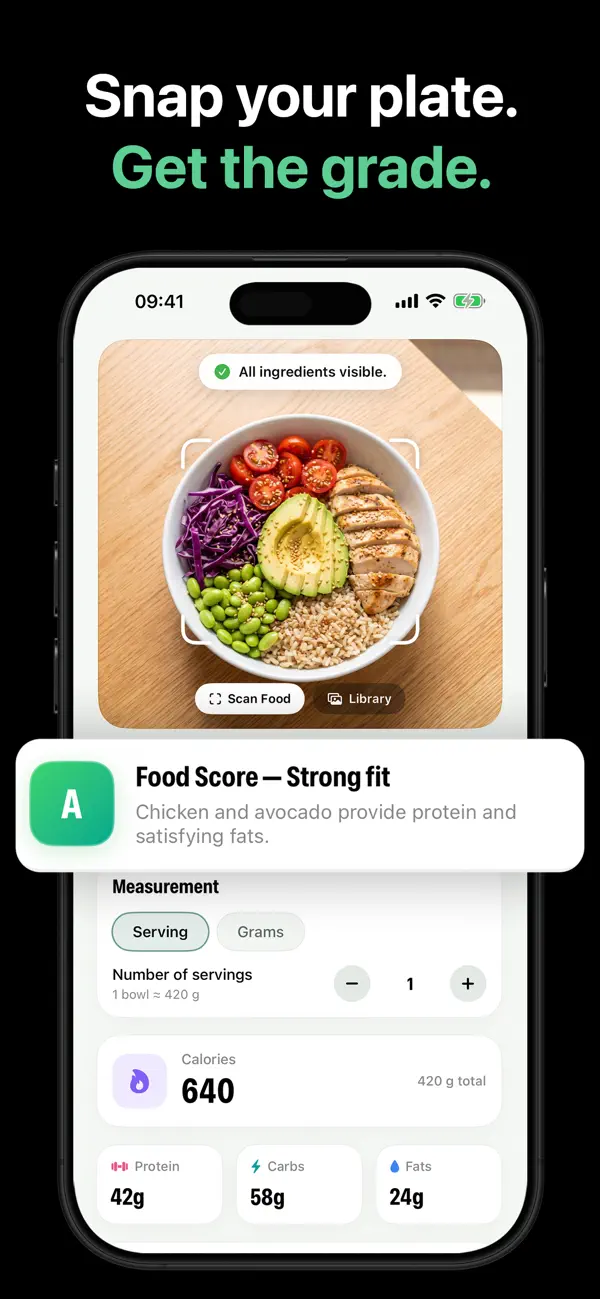
This is the modern default. Take a picture of your plate; an AI tracker like SnapFood identifies each ingredient and assigns it a portion estimate from visual cues — plate size, food height, how items sit against each other. You get calories, protein, carbs and fat without touching a scale, and the whole log takes about ten seconds.
Two things make photo portioning work in practice:
- The estimate is visible, not hidden. SnapFood shows the assumed amount (e.g. “1 bowl ≈ 420 g”). If that looks off, change it.
- Adjusting is trivial. Flip between servings and grams, nudge the number, and calories, macros and the meal's grade update instantly. Ate two-thirds? Log 0.7 servings and move on.
Method 2: hand measures (surprisingly decent)
Your hand scales with your body and is always attached to you:
- Palm ≈ one serving of protein (roughly 85–115 g cooked)
- Fist ≈ one serving of vegetables
- Cupped hand ≈ one serving of carbs
- Thumb ≈ one serving of fat
Hand measures are great for building intuition and double-checking a photo estimate that looks suspicious. They're rough — but rough and consistent is exactly what trend-based tracking needs.
Method 3: make your containers do the measuring
If you eat from the same bowl, mug and glass every day, you only need to figure out each one once. Your cereal bowl is your cereal unit. SnapFood's Meals Library leans into this: scan your usual breakfast once, then hit Log again every morning after — same bowl, same estimate, zero effort.
When weighing still earns its place
Honesty corner: a scale is still the right tool in a few spots.
- Calorie-dense foods. Oil (~120 kcal per tablespoon), nut butter, cheese, granola — a 30% eyeball error here is a real number of calories.
- A short calibration phase. Weighing your staples for one or two weeks teaches your eye what 60 g of oats actually looks like. Then retire the scale.
- Baking. That one's just chemistry.
For everything else, a consistent estimate beats an abandoned spreadsheet. If you're worried about estimate quality, read how accurate are AI calorie counters — the short version is that consistency matters more than precision.
Do it in SnapFood: the no-scale workflow
- Scan the plate. Photo first, before you eat. The AI proposes ingredients and portions.
- Check the assumed amount. “1 bowl ≈ 420 g” — sounds right? Keep it. Looks generous? Drop it.
- Correct the invisible. “Cooked in olive oil.” “Half the dressing.” One sentence, instantly recalculated.
- Reuse your staples. Repeat meals live in the Meals Library — one tap to log again, portions remembered.
- Watch the week, not the meal. Your day grade and weight trend tell you if the method is working. If the trend says yes, your portions are accurate enough.
Retire the food scale
SnapFood estimates portions from the photo and lets you adjust in servings or grams. Free on the App Store and Google Play.
Frequently asked questions
Can you count calories accurately without a food scale?
When is a food scale still worth it?
How does SnapFood estimate portions from a photo?
Nutrition values, grades and recommendations in SnapFood are AI-generated estimates and may be inaccurate. This guide is general information, not medical or dietary advice. Consult a qualified healthcare professional before making health or diet decisions.